Showing posts with label Go green. Show all posts

Tuesday, August 25, 2009

iPod Touch & Sewing

I found another great use for the iPod Touch.  I found the best way to keep track of my sewing stitches and the adjustments I make to the stitches on my new Janome 6600 is to take a close-up picture of the foot used and then type notes on the photo.

1282If you click on the pic above, you will be able to read the note better on the enlarged pic.  My note tells me the Needle Position to use for a 1/4” seam when using the Open-Toe AccuFeed foot.  And the red arrows remind me where to line up the raw edge of fabric with the foot.

Putting this in the IPod Touch saves on ink and paper as I don’t have to print it out.  I bring my iPod Touch into my sewing room a lot.

Monday, August 10, 2009

Christmas Shopping Bag & EZ shopping bag

817 I wrote a tutorial for a Christmas Shopping bag last November.  Thought I’d bring it back now, in case anyone would like to make one for this Christmas.  They make nice gifts.  The can be used to “wrap a gift”.  Make one for yourself to put your Christmas shopping items in.  http://anotherpatch.blogspot.com/2008/11/christmas-shopping-bag-tute.html

And if you want to make some super-easy-to-construct Shopping Bags that are good give-aways, here’s a link to my bloggin’ buddy Sunnie’s http://patchworkpie.blogspot.com/2009/08/fabric-bags-e-z-way.html tutorial.

Monday, May 18, 2009

More Fabric Bags

bag0905angela2

Cute Pooh bag, eh?  Angela from Country Scrap Quilts (blog) sent me this pic of Fabric Bag that she made from my directions.  She’s made quite a few of these bags & if you’d like to see more bags from her and others, go to my Fabric Bag Gallery on my website.  You can also find a link to the directions for the regular Fabric Bags and also a link to directions for a Christmas Shopping Bag on that webpage.  Never too early to start in on that Christmas sewing.

Angela asked for my permission to sell some Fabric Bags that she made from my directions.  She is now selling them in her Etsy shop and on her website – Country Scrap Quilts.  Hope you sell oodles, Angela! 

I like it when people send me pics of the bags they make.  I love it that people are using the Fabric Bags instead of the ugly plastic things.  Fabric Bags hold so much more and you feel so “green” using them!

I was chatting with a new checker at the grocery store the other day and she said - “I remember you, you’re the one with the pretty bags.”  Yah, that’s me all right, pretty bags & all!  LOL  ;-)

Monday, February 2, 2009

Fabric shopping, EQ, iPod Touch

I’d like to thank Penny & Andrea over at ElectricQuilt for creating a whole bunch of traffic to my blog today! I was mentioned on the EQ blog for my entry on Friday.

I had sent EQ an email saying I had found a good marriage between the iPod Touch and EQ and they agreed and posted my link today. In the EQ blog it said -- “She moves images from EQ to her IPod Touch and takes the IPod to the fabric store! Not only does she save paper, but going from computer screen to IPod screen, she doesn’t have to deal with the way printers and monitors are calibrated.”

There definitely is a difference between the colors I see on my monitor and the colors that print.

I've got a quilt that I will be making here in the not too far distant future and I will let you know how the iPod Touch helps me with my fabric selection.

Friday, January 30, 2009

Fabric shopping with iPodTouch

Found out the coolest and greenest thing (no printing) to do with my iPod Touch. My method works with EQ6, but you might find other uses.

When I design a quilt in EQ6 and print out the Fabric Yardage to take with me to the store, I find the printout is “not exactly” what I viewed on my computer monitor in the design process. BUT if I view an exported image of the fabric, it looks “exactly” like what I saw on my computer. AND when I put that image in my iPod Touch, it gives me a much better idea of what fabrics I need to get. Can zoom in and out of the pic, too.

The fabrics I used to design the quilt might not be available when I go shopping. Why do fabric manufactures have to change their lines so often? I have some wonderful fabric in my stash that was purchased years ago and it is just as “current” as fabrics of today. And is sometimes just “exactly” what I need. I hate using up a favorite fabric, cuz I know I won’t be able to replace it.

So, if those desired fabrics are not available when I go shopping, when I view the fabric images on my iPod, I get a pretty close representation of what I need and can buy something that is “close enough”.

I found that creating 3 images covers all bases.

1) An exported pic of the quilt (a faraway look)

2) A “print screen” of the fabrics from the sketchbook (a close-up of fabrics)
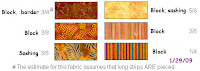
3) A “print screen” of the fabric yardage page (yardage requirements)

2 & 3 were manipulated in PaintShopPro with some text added on 3. Actually, all you’d have to do is crop them and maybe add some text to 3 – like the date. And with the “zoom in” feature on the iPodTouch, you can view all of what you want to see.

If you have the current edition of “Stash” and used fabrics from there, you could probably find those fabrics still at your Local Quilt Shop. Then you might want to go the extra step and take a “print screen” of each fabric and its notecard. That way you would have the Manufacturer, the line and the numbers needed to purchase that fabric. No paper needed! Is this green or what!
I’m thinking that shopping at online shops would be easier by matching the iPod Touch image of fabric to an online image of fabric.

Friday, December 26, 2008

Another Bag in the Gallery

Qpal Jana http://sentimentalquilts.blogspot.com/ sent in her pic before Christmas, but with having my PC in the shop and Christmas celebrating, I wasn’t able to find time to put her bag in the Gallery until today.
Here’s a link to the Gallery where there are more bags to see. http://anotherpat.com/fabricbaggallery.htm

Monday, December 15, 2008

Shopping Bag Gallery - 2 more bags

Qpal Marleen from Alaska made a couple bags and used webbing for the handles -- that makes the bag construction go faster.
http://anotherpat.com/fabricbaggallery.htm

Thumbdrive Jacket Tute

Today’s Christmas song of the day – “A Holly Jolly Christmas” by Burl Ives
http://heavens-gates.com/fifties/hollyjollychristmas.html

I do not like to put my thumbdrive in my purse unprotected. And it is so easy to misplace the thumbdrive cuz it is so small. It holds a lot of files and pics and I don’t want to lose it. I thought of making a covering for it – a jacket! Now, this I feel comfortable throwing in my purse. Use a Jacket to slip some folded money into when putting in your jean’s pocket – less likely for money to pop out of pocket.

For many Christmases, I have been making a keepsake item for my gkids. This year it’s the Thumbdrive / Money Holder jacket.

These sew up quickly, so if you need something like this for Christmas, you can do it up fast. I have created a PDF for the convenience of printing off the directions and taking them into the sewing room. You can even make a “Super Fast” version of the jacket that sews up, welllll --Super Fast – in about the time it takes to wrap a present!
http://anotherpat.com/ThumbdriveJacketByPatTribbey.pdf

Each Thumbdrive Jacket requires a piece of fabric 20” x 3-1/4”. (Super Fast version takes 10” x 3”)
Finished Jacket measures 2-5/8” x 4-1/2”.

If you make any Thumbdrive Jackets, please send me a pic and I will put it up in a Gallery.

Wednesday, December 10, 2008

Shopping Bag Gallery – 2 bags

Another finished bag has been added to the “Gallery of Fabric Bags”. Elizabeth made longer handles and a “beefed-up bottom”.
http://anotherpat.com/fabricbaggallery.htm

Thursday, December 4, 2008

Bags - sack, square bottom, book

I’ve been making gift bags for ages. I just hate to pay crazy amounts of money for pretty paper that gets all ripped & crumpled in 2 seconds flat. Plus. I can use up some stash. But, usually, I will buy real cheap fabric at Walmart or Joann’s which turns out to be much cheaper than pretty paper and I get a much bigger piece. Very nice when I have a large gift.

People are still using these bags from years ago! I usually just make a sack for the size of the object. Gather the whole thing in your hand at the top and tie a ribbon or fabric tube into a bow. The denim one above is suitable for a someone in college and is handy for a laundry bag.

Angie Padilla has some easy gift bags.
Square bottom bag – like the paper ones with handles
Book bag – when giving a book as a gift

If “Angie Padilla” sounds familiar to you, she wrote the book “ EQ6 Applique Drawing” from the folks at Electric Quilt. I have learned so much about drawing from her book. Never have been able to draw. Now, I draw with a mouse! Go figure …

Wednesday, December 3, 2008

Shopping Bag Gallery

It is always so nice to see other’s versions of one’s design. When another sew-er makes that item from the design, then it is assumed that the directions were accurate! ;-) Denise from Canada sent me a pic of the Christmas Shopping Bag that she completed.

Thank you, Denise! I see you used a different fabric for each tree. You must have started the bag shortly after I put up the tute. And I have put your bag in the #1 spot on the Gallery page for Fabric Bags. It shall remain at the top forever. Other pics will go in the next spots below.

Christmas Shopping Bag instructions

I hope to get lots of pics! It will be so neat to see other’s interpretations of the design – or what they can do with a plain bag.

I like blogging. It reminds me so much of the days in the old AOL Quilting Community. We got such nice feedback from the quilters for just about anything we did. And then there would be the quilting chat rooms where we could discuss all what was going on. Yah, I think AOL had a good idea and I think they made a big mistake when they got rid of all the Communities.

Monday, December 1, 2008

Printing pages

While talking with a friend, I realized that she didn’t know that her printer could print more than 1 page to a sheet. So I thought I’d blog about it, in case others didn’t know about this. You’ll really save on paper.

There might be different options on your printer or your printer may not even offer the options that mine does, but here’s what I can do on my HP OfficeJet 6210.

FILE > PRINT > PROPERTIES (or PAGE SETUP > PRINTER > PROPERTIES)
I am shown 7 different tabs that offer different options.

On the FINISHING tab, I can choose the number of pages to print PER SHEET of PAPER! If I print webpages, I usually use the 2 pages per sheet option and I can read the print just fine.

After I click 2 pages per sheet, I get an option in the right column where I can print PORTRAIT or LANDSCAPE.

Go through your printer “preferences” or “options” and see what’s available to you.

I really like the ability to print more than one page per sheet. If I print directions off of a webpage (or from a PDF file), I can get away with using far less paper.

And if you use PRINT PREVIEW in your Browser, you can see which pages you want (or don’t want) to print. And that saves on paper, too.